SECURIDIGM COMPLY
Securidigm Comply · Compliance Assessment Tool

Every TSA Security Directive and
USCG 33 CFR Subpart F requirement.
One file. Zero install. Zero network connections.

A complete compliance assessment program for pipeline, freight rail, passenger transit, and MTSA-regulated maritime operators — every individual requirement of the five surface cybersecurity Security Directives and of 33 CFR 101 Subpart F, scoped to your operation, guided question by question, with the evidence trail an inspector actually asks for. It runs from a double-click and never sends your data anywhere.

414individually tracked requirements
6instruments — 5 Security Directives + 33 CFR 101 Subpart F
0network connections — verifiable
1file. No install, no account, no cloud
9document generators — CAP, report, CIP, policies, incident reports, maritime Plan, Assessment, pen-test letter, CIRP
file:///C:/compliance/securidigm-comply.html
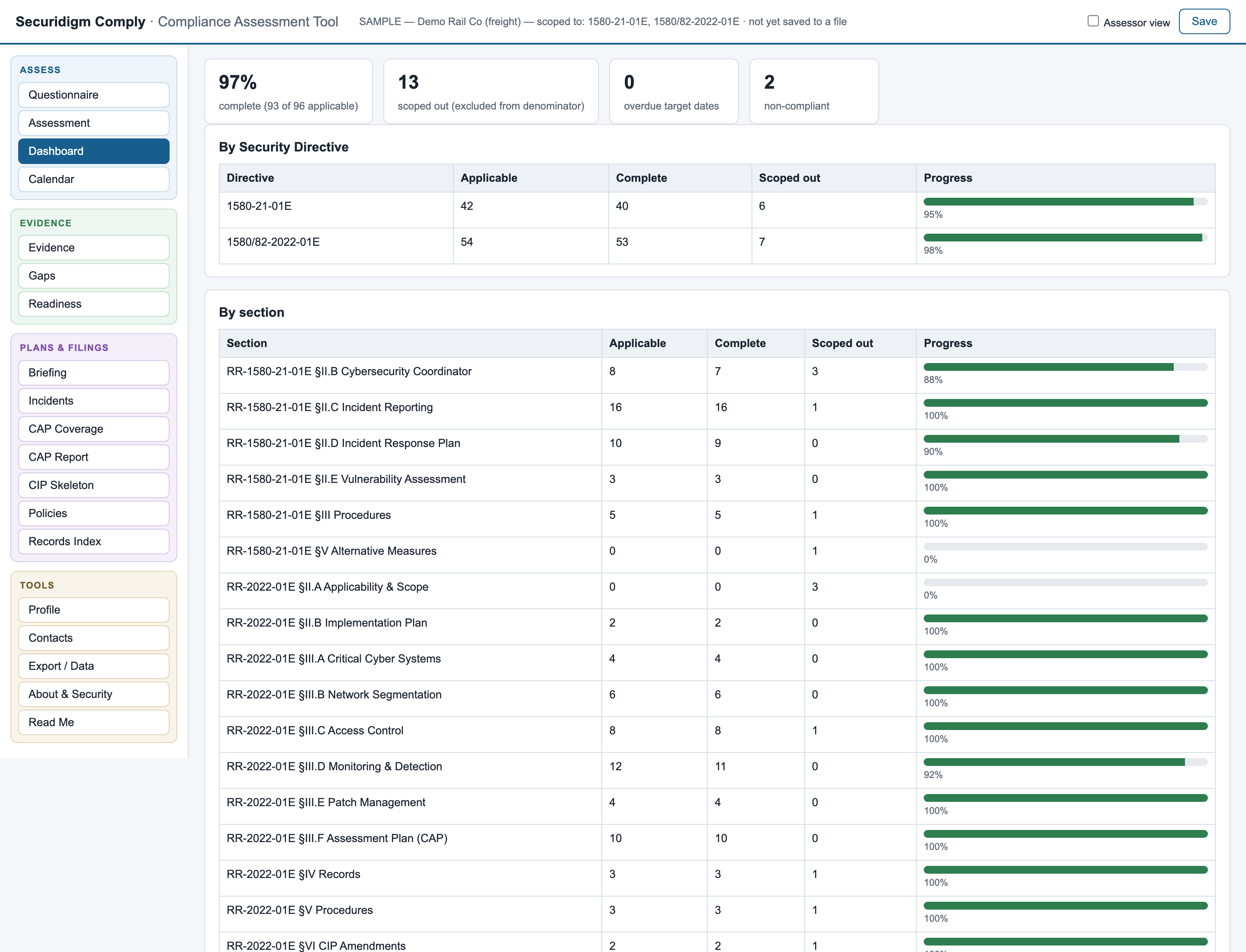
Compliance dashboard with completion by directive and by sectionClick to enlarge
Why this exists

The directives weren't written for a four-person IT team.

TSA's surface cybersecurity directives are five separate documents with different requirements per sector, deadline clocks anchored to four different dates, and an annual renewal cycle that changes the text under your feet. Missing any of it is a finding.

01Five directives, renewed yearly

Pipeline, freight, and passenger requirements differ in ways that matter — the incident triggers, the response-plan objectives, even the reset-password rule are not the same document to document.

02Clocks everywhere

72-hour incident reports. 24-hour supplements. 7-day coordinator updates. 60-day notices. Annual plans, exercises, and reports anchored to approval dates nobody wrote down.

03TSA inspects your plan, not the directive

For the mitigation-series directives, the audit surface is your TSA-approved Implementation Plan. Drift from your own commitments and you can be non-compliant while every generic checklist shows green.

04"Prove it" is the real test

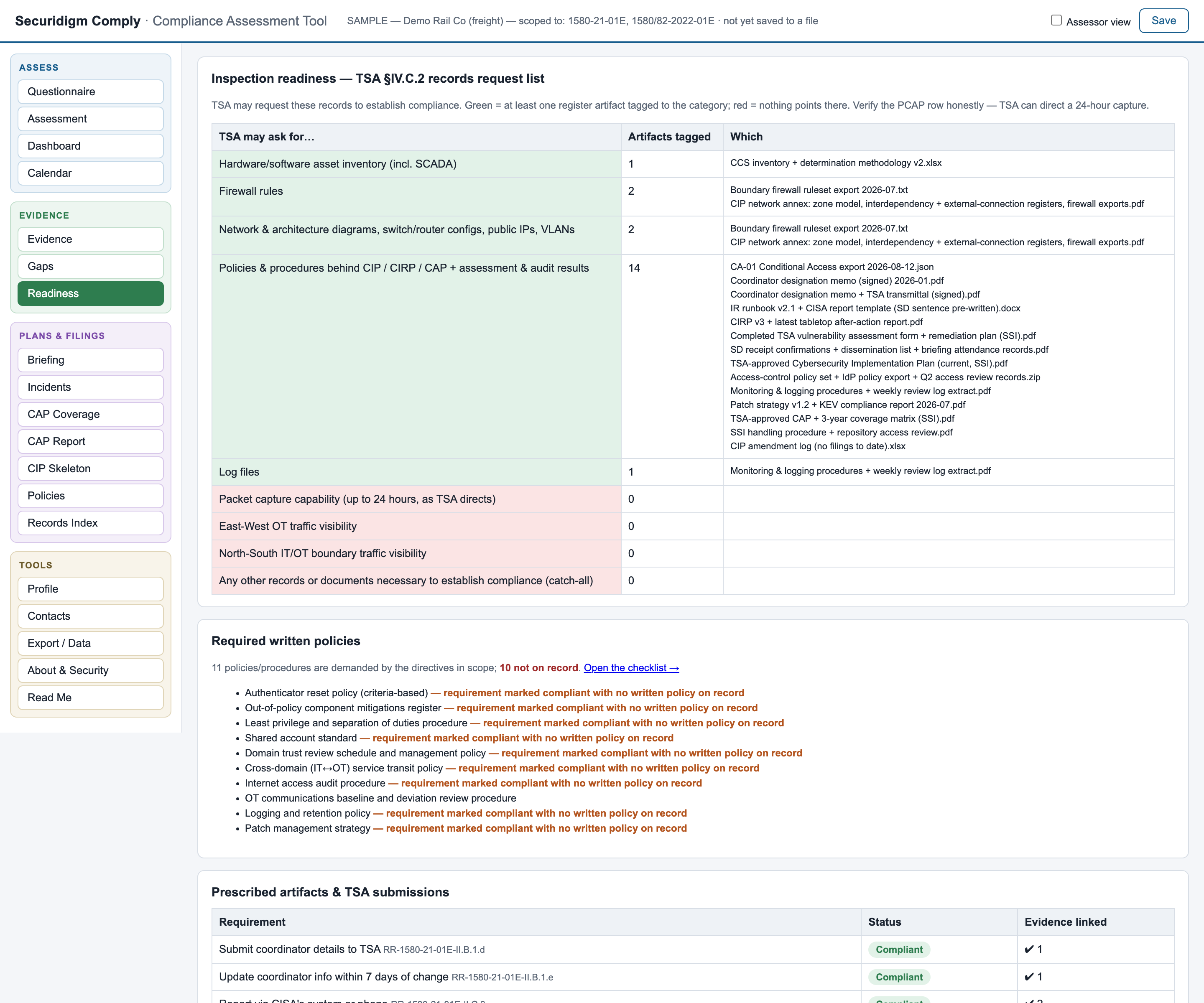
An inspector can request your asset inventory, firewall rules, diagrams, logs — even a 24-hour packet capture. The question is never whether you did the work; it's whether you can show it in five seconds.

Watch it work

From blank file to defensible program.

Real screenshots, real sample data, no mockups — this is the actual tool, which you can hold in your hands five minutes from now.

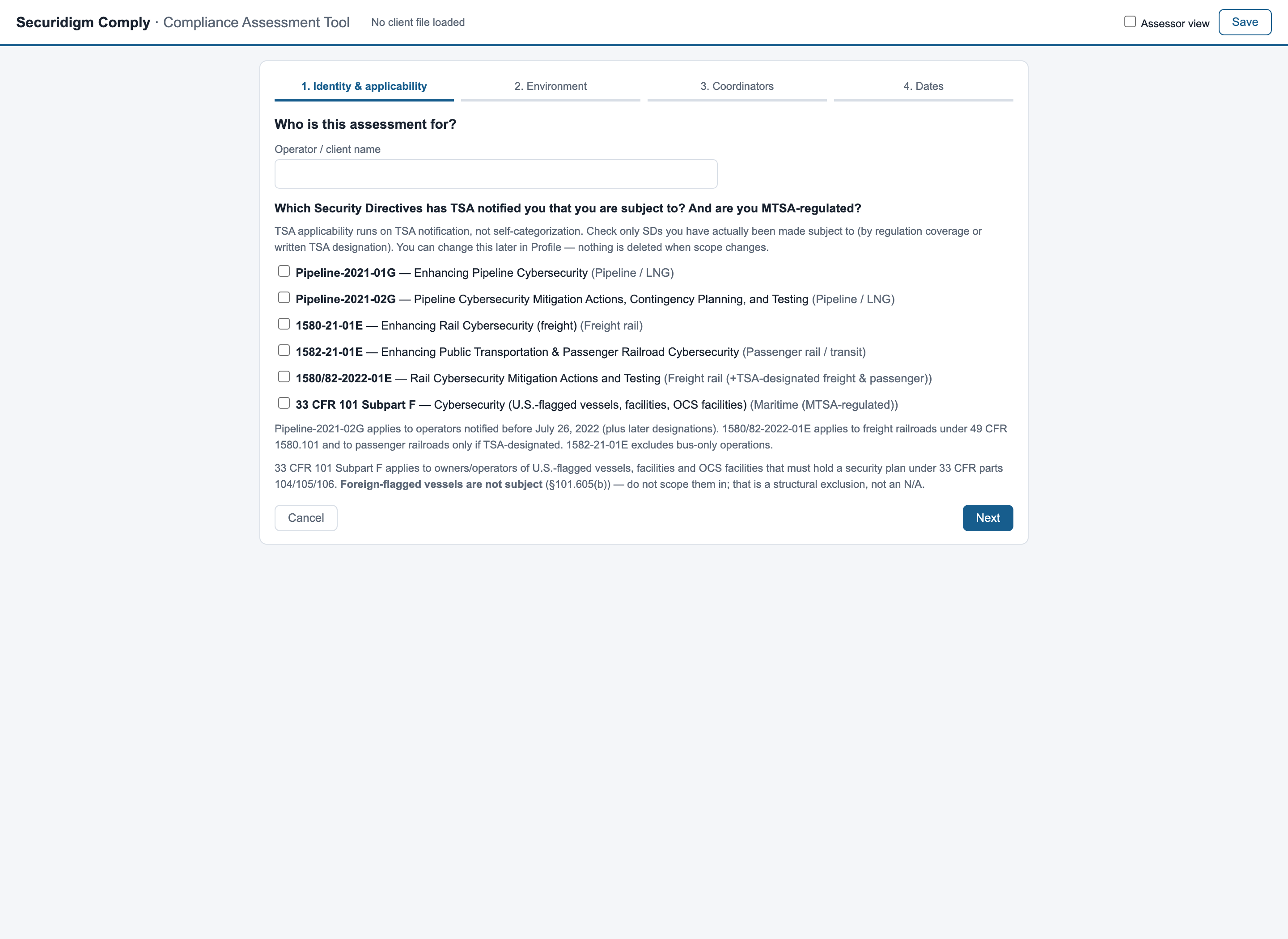
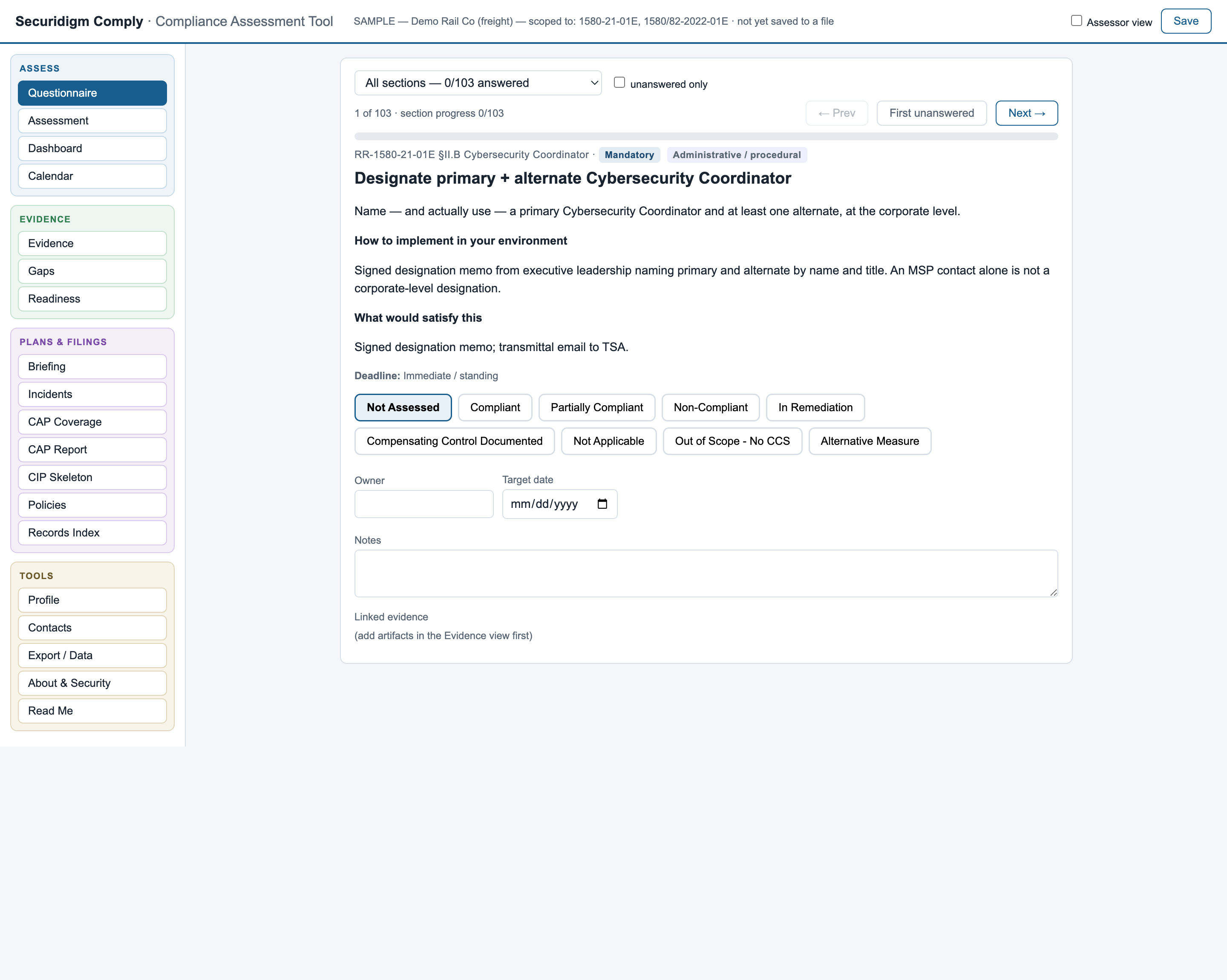
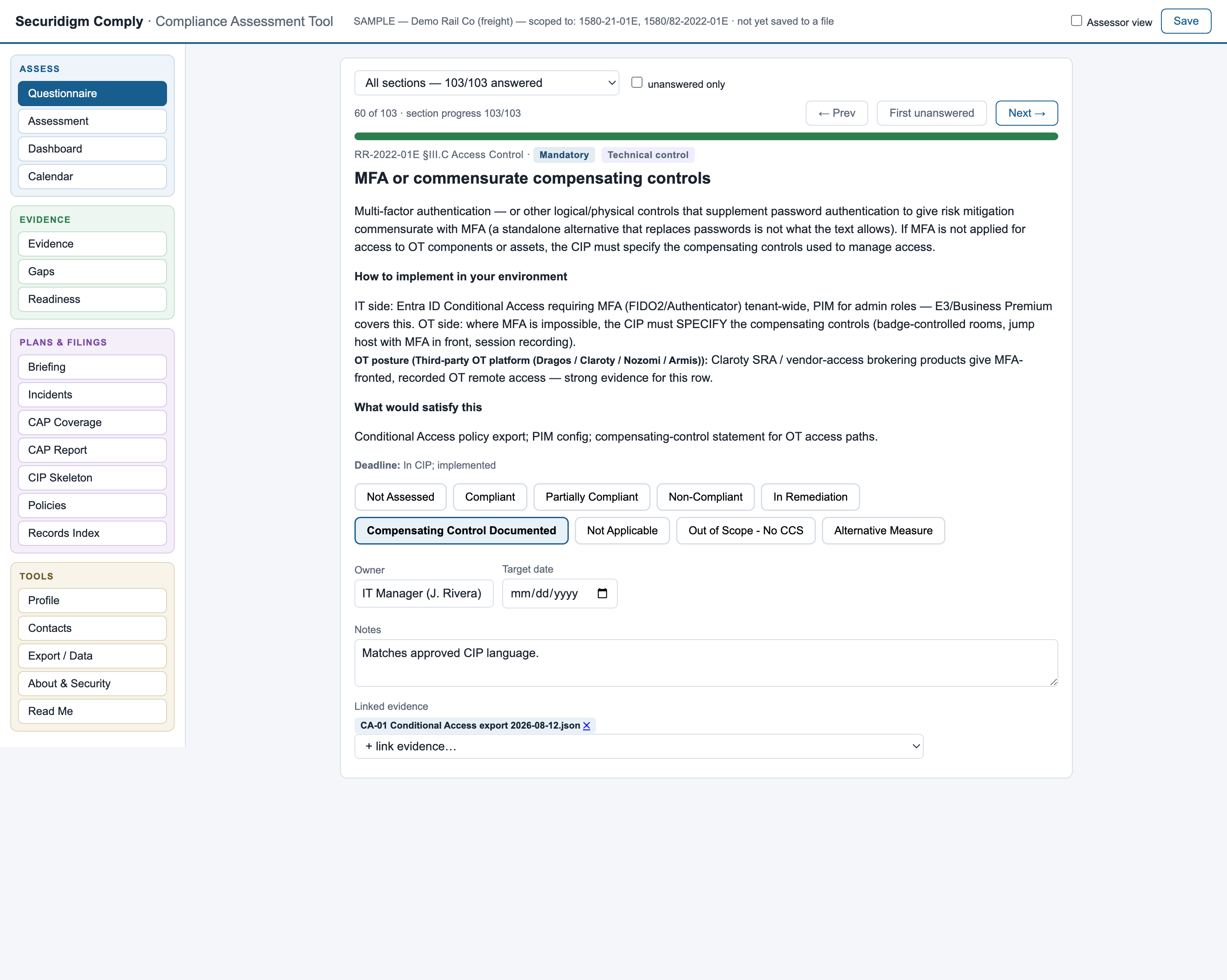
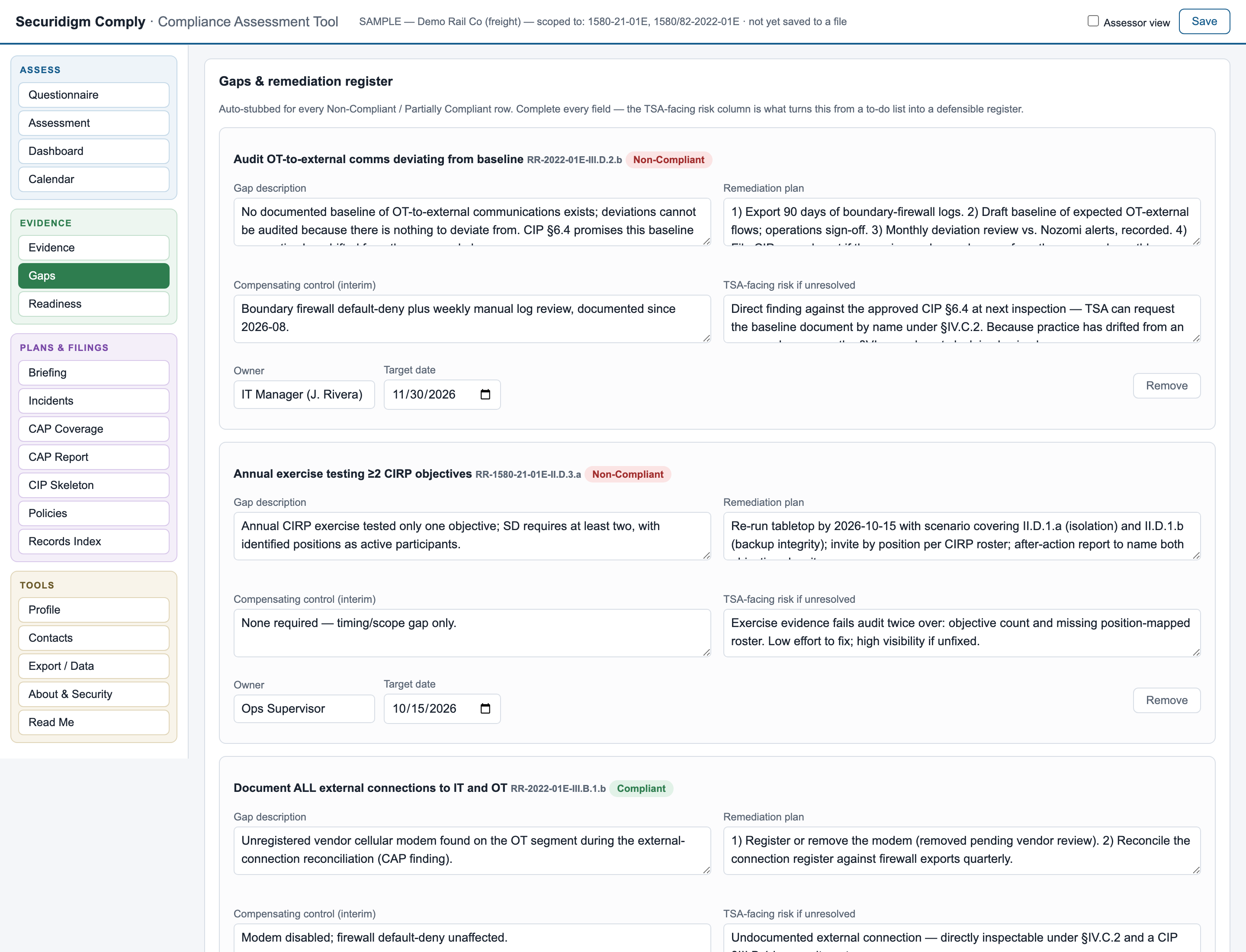
Setup wizard Questionnaire, unanswered requirement Questionnaire, answered with evidence Dashboard Gap register Incident report builder with the 72-hour clock Maritime edition — 33 CFR 101 Subpart F assessment grid
01
Built around how the work actually happens

Everything the directives demand, nothing you don't need to see.

Six areas below, numbered in the order you use them: scoping, assessment, deadlines, evidence, readiness, assessor layer.

01 — Scoping

Scoped to your operation before you answer anything

A four-step setup interview asks the only question that legally matters — which directives has TSA notified you that you're subject to — plus a handful of scoping facts (shared accounts? PTC? a non-U.S. coordinator?).

  • A pipeline operator sees ~40–110 requirements, never the rail catalog
  • Conditional requirements scope out automatically, with the reason recorded — so the inspector's "why isn't this here?" always has an answer
  • Fully reversible: a mid-year TSA designation is a checkbox, not a re-assessment
Setup — 1. Identity & applicability
Setup wizardClick to enlarge
02 — Assessment

A guided questionnaire that speaks operator, not regulation

One requirement per screen: plain English first, the section cite as a footnote. Every screen tells you how to implement it in your environment — naming actual tools and configurations — and what evidence would satisfy it, down to "an attendance roster by position, because a sign-in sheet without positions is the classic audit failure."

  • Work any section in any order; "unanswered only" mode auto-advances as you go
  • Guidance adapts to your OT tooling and your IT stack — Microsoft shop or not
  • Marking a requirement non-compliant automatically opens a gap entry
Questionnaire — requirement detail
Guided questionnaireClick to enlarge
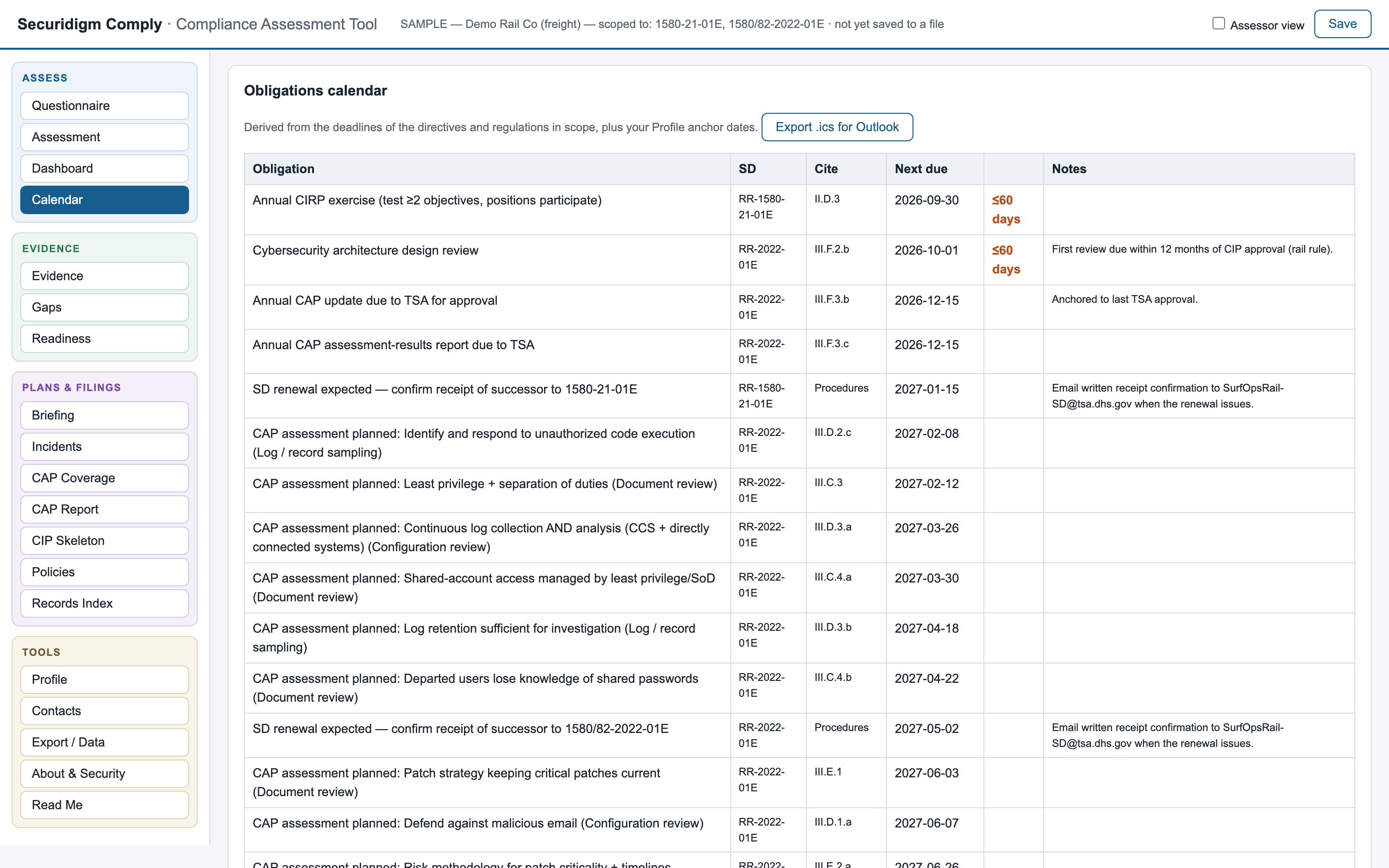
03 — Deadlines

A calendar that already knows your deadlines

Enter your anchor dates once — plan approval, last exercise, last assessment — and every derived obligation appears with its clock: annual plan updates, exercise anniversaries, biennial architecture reviews, amendment windows, the next renewal.

  • Overdue and due-within-60-days flagged automatically
  • One-click .ics export drops every deadline into Outlook, where deadlines actually survive
  • Standing duties — the 72-hour report, the 7-day coordinator update — listed so nobody has to remember them
Obligations calendar
Obligations calendar with an overdue itemClick to enlarge
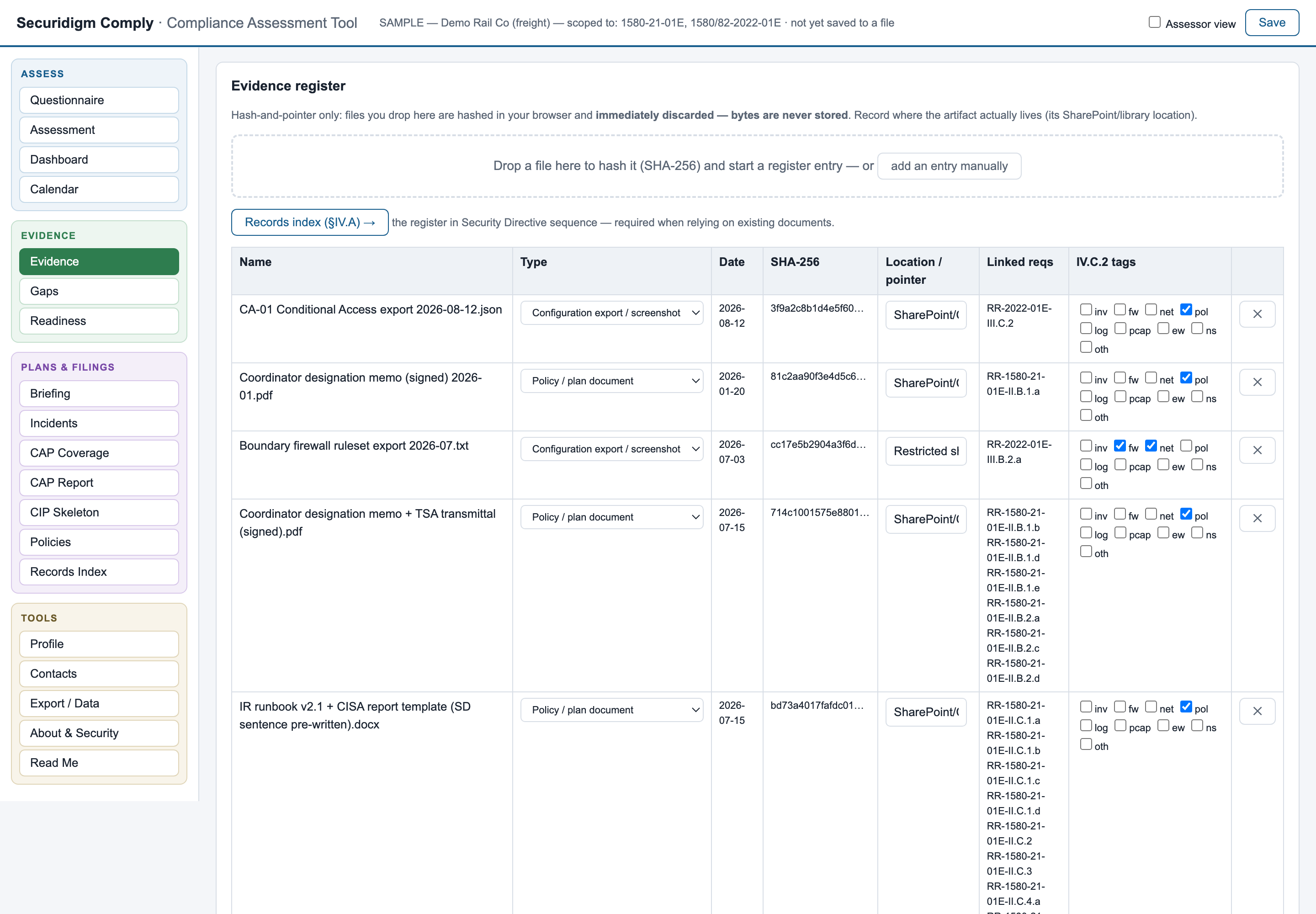
04 — Evidence

Evidence by fingerprint — your documents never enter the tool

Drop a file on the register: it's hashed (SHA-256) in your browser's memory and the bytes are immediately discarded. What's recorded is the name, date, fingerprint, and where the artifact actually lives. Your firewall rules and network diagrams stay in your controlled repository — the tool holds proof they exist and haven't changed, never the documents themselves.

  • One artifact links across many requirements — the way real evidence works
  • Tagged against TSA's own inspectable-records list
Evidence register — SHA-256 fingerprints
Evidence register with hashes and pointersClick to enlarge
05 — Readiness

Inspection readiness, answered before TSA asks

The directives list exactly what TSA may request to establish compliance — inventories, firewall rules, diagrams, policies, logs, packet captures. The readiness view cross-references that list against your evidence register: green where you can produce it, red where you can't. Including the one that catches everyone: could you deliver a 24-hour packet capture at the OT boundary this week?

Inspection readiness
Inspection readiness viewClick to enlarge
06 — Assessor layer

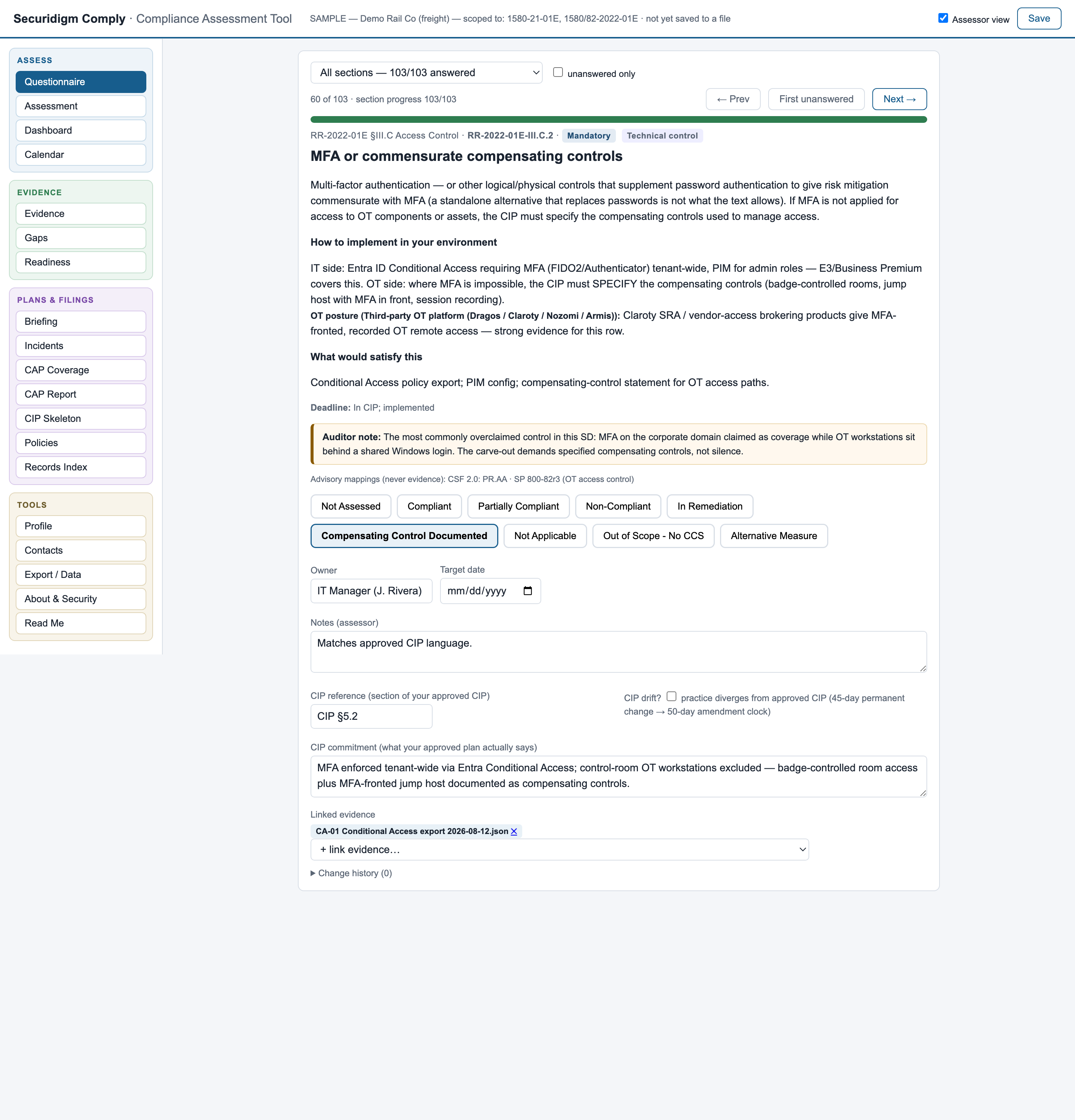
For the assessor: the layer TSA actually inspects

An assessor view adds what a consultant needs and an operator doesn't: requirement IDs, candid commonly-failed commentary, advisory framework mappings (NIST CSF 2.0, SP 800-82), and the Implementation Plan commitment layer — what your approved plan promised, next to what you actually do, with a drift flag that watches the amendment clock.

Assessor view — CIP commitment fields
Assessor view with CIP commitment fieldsClick to enlarge
Boardroom-ready in one click

A print-to-PDF executive briefing: completion, overdue items, filings due in 90 days, top risks. What you hand a GM who will never open the grid.

A real Excel workbook, generated on demand

Read Me, live-formula dashboard, full assessment, gap register — frozen headers, dropdowns, autofilter. Stands entirely alone; no app needed to read it. Zero lock-in.

Built for the renewal treadmill

When TSA reissues the directives each year, your file migrates: statuses carry forward, changed requirements are flagged for re-review, and the what-changed report is stored as a permanent audit trail.

Not a Microsoft shop? Covered.

Guidance defaults to Microsoft 365/Azure tooling; flip one setting and every affected requirement shows the capability actually required plus common equivalents — CrowdStrike, Splunk, Okta, Tenable, Veeam and more.

Gap register with the column that matters

Every gap carries description, dated remediation plan, interim compensating control, and the TSA-facing risk written the way an inspector would see it.

Honest status math

Scoped-out requirements leave the denominator entirely. "Not Applicable" requires a reason. The two statuses that legally require notifying TSA say so, loudly.

The filings TSA actually inspects

From assessment to the documents your regulator asks for — generated, not retyped.

Maritime operators get the §101.630(c) Cybersecurity Plan skeleton — all fourteen prescribed sections — plus the Assessment record, the penetration-test certification letter, the Cyber Incident Response Plan starter, and NRC incident records on the correct without-delay regime.

The mitigation-series directives require three approved artifacts — an Implementation Plan, an Assessment Plan, and an annual Assessment Report — plus timed incident reports and the written policies the directives demand by name. Securidigm Comply builds each one from the assessment you already did, and refuses to produce anything that would certify a breach.

07 — Incidents

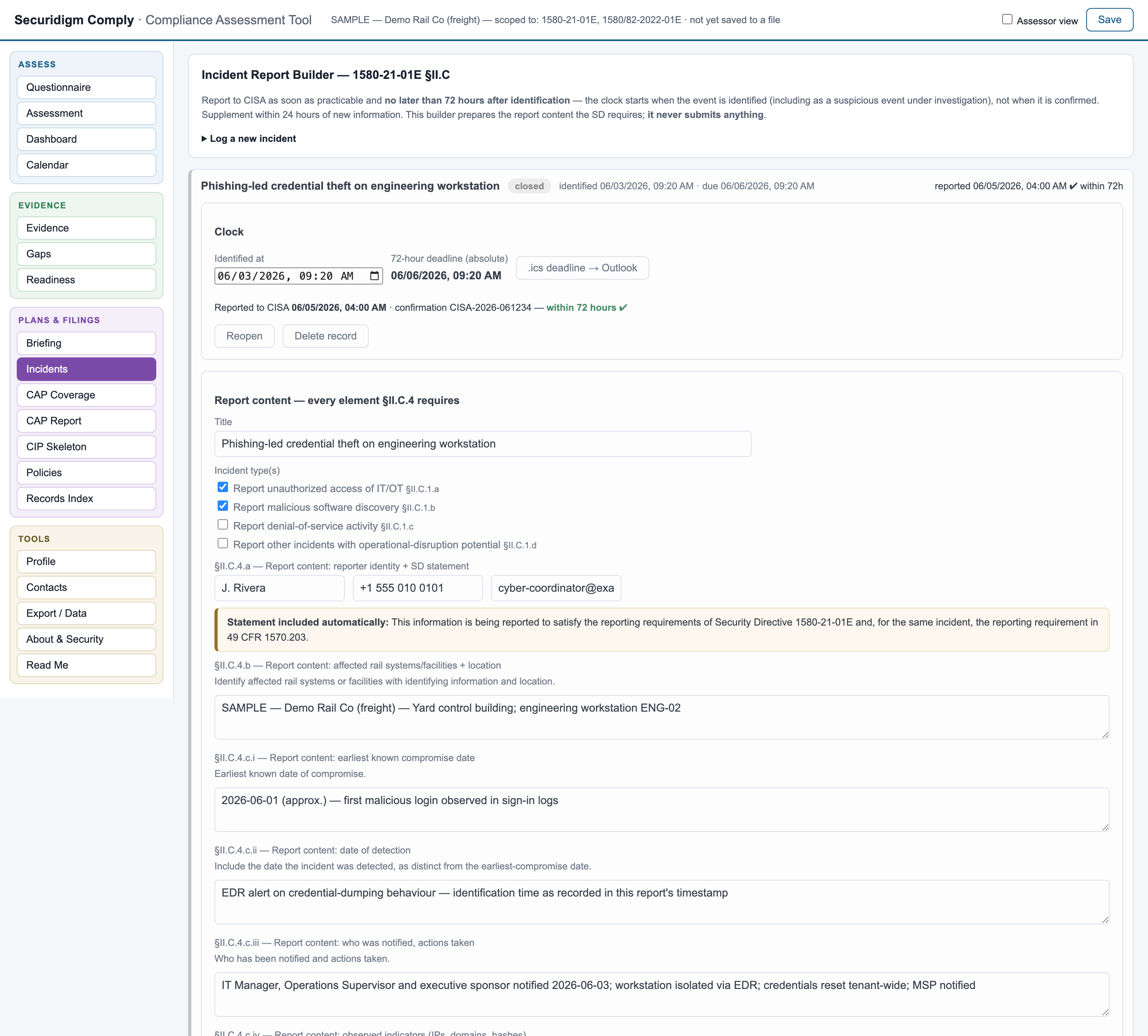
Incident Report Builder with the 72-hour clock

Log an incident with the moment it was identified — backdated to the real time, because that is when the directive's clock starts, not when you opened the tool. A live countdown runs against the absolute deadline; every "new information" entry starts its own 24-hour supplement clock.

  • Report fields are your sector's, drawn from the directive — five incident types for pipeline, four for rail; the 1570.203 dual-reporting sentence only where it applies
  • Paste-ready text for the CISA form, a one-click Outlook reminder with a 12-hour alarm, print-to-PDF
  • "Record as reported" judges within-72-hours or late and files the report into your evidence register automatically
  • It never submits anything — reporting stays a deliberate human act
Incident report builder — 72-hour countdown
Incident Report BuilderClick to enlarge
08 — Assessment plan

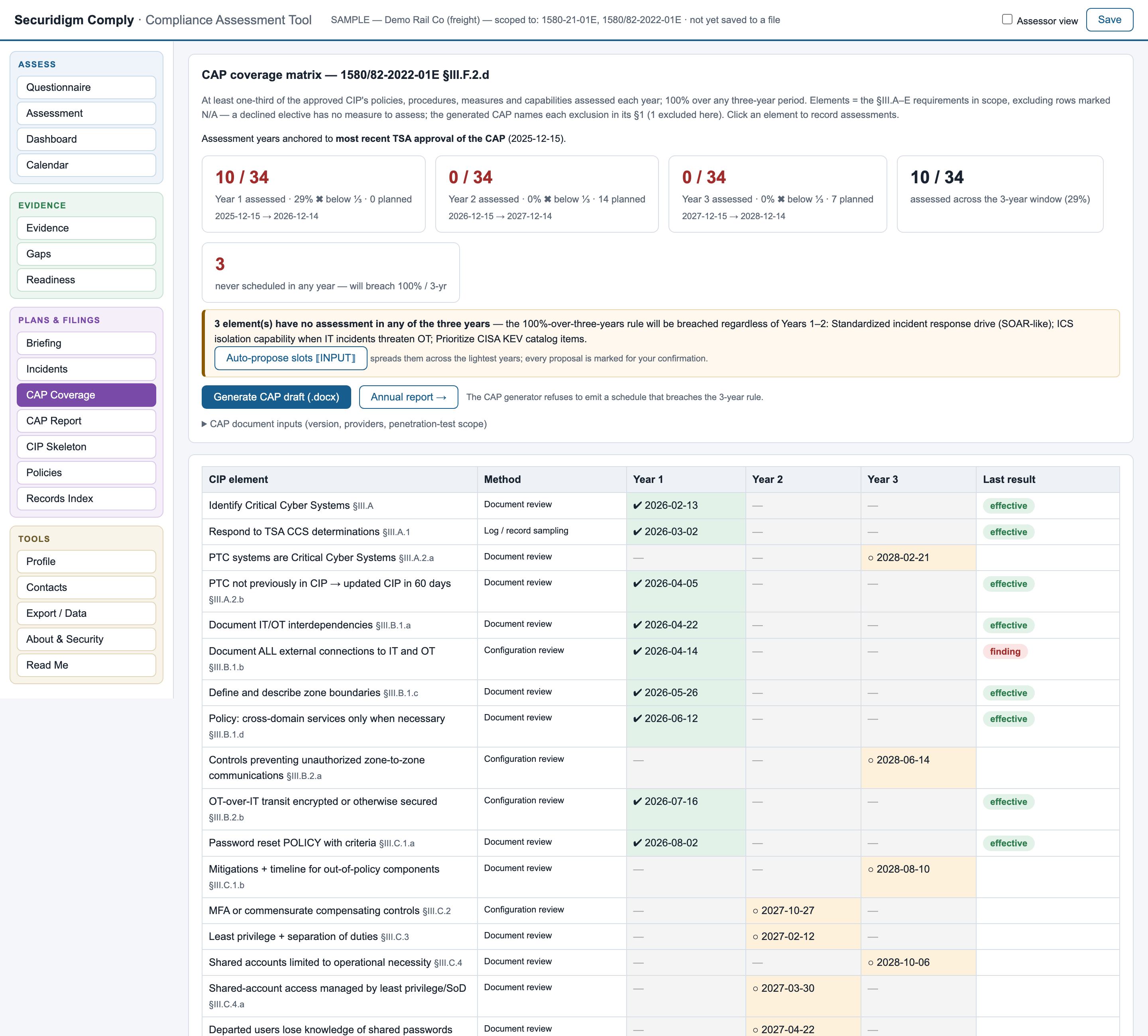
CAP coverage matrix, the Assessment Plan, and the annual report

The directive requires a third of your plan's measures assessed every year and all of them within three — and almost nobody tracks it. The matrix does: per-element assessment records across three years anchored to your approval dates, with the finding nobody sees coming flagged in red: elements never scheduled in any year.

  • Generates the Cybersecurity Assessment Plan as a Word document — and refuses while any element is unscheduled
  • Generates the annual report exactly as §III.F.2.e asks it: methods used, results per element, findings tied to their gap dispositions, unassessable elements disclosed rather than omitted
  • Planned assessments land on the calendar and in Outlook
CAP coverage matrix — three-year view
CAP coverage matrixClick to enlarge
09 — Implementation plan

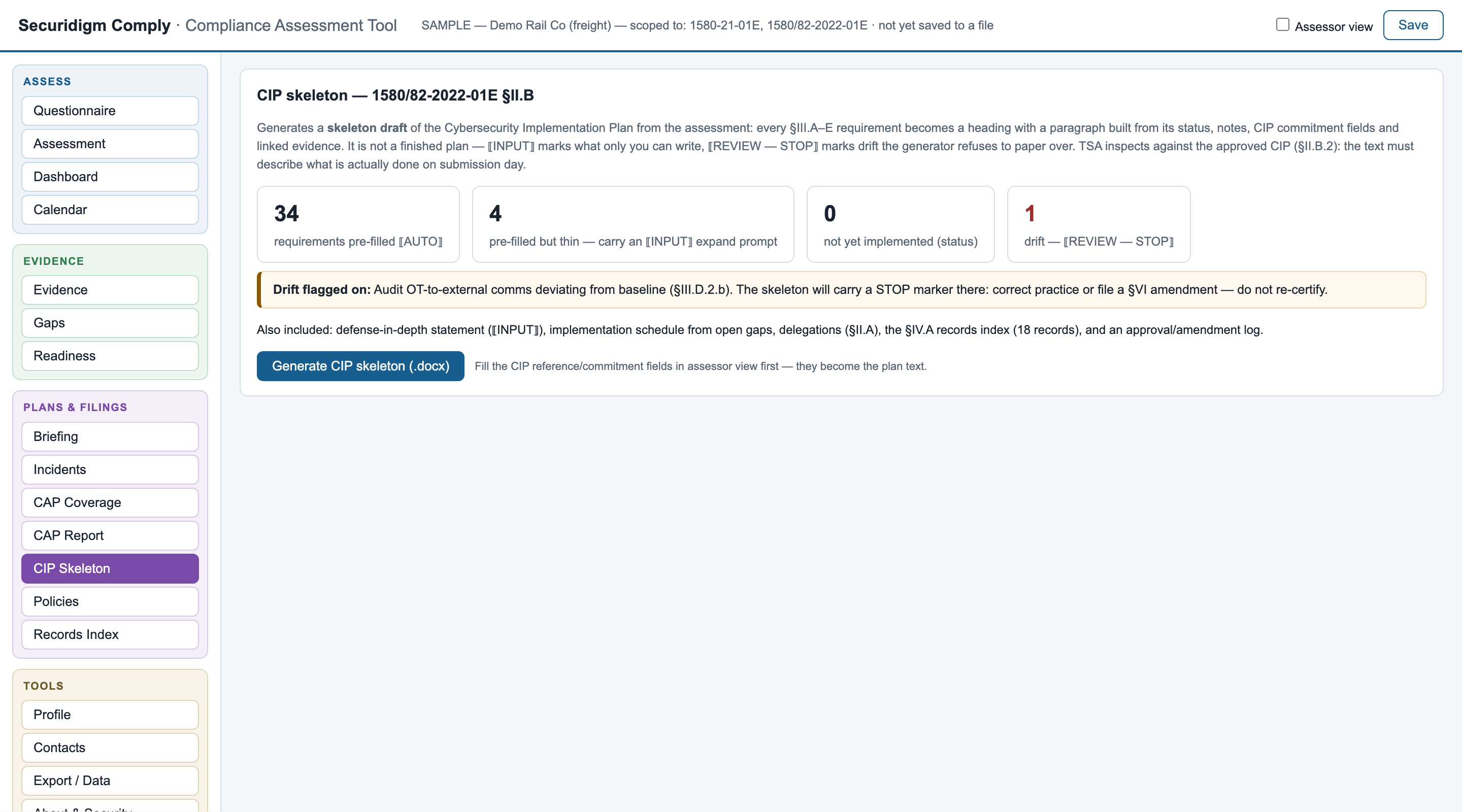
A CIP skeleton that refuses to paper over drift

Every §III.A–E requirement becomes a heading with a paragraph built from its status, notes, approved-plan commitment and linked evidence. What the tool can't know is marked ⟦INPUT⟧; what the assessor must check is marked ⟦REVIEW⟧ — and where practice has drifted from an approved commitment, the draft carries a STOP instead of re-certifying the old promise.

  • Status table up front: pre-filled vs. needs input vs. drift
  • Implementation schedule from open gaps; delegations; the §IV.A records index as Section 8
  • Word format, hand-written — no library, no network
CIP skeleton generator
CIP skeleton generatorClick to enlarge
10 — Policies

The policies you're required to have in writing — and the ones you're missing

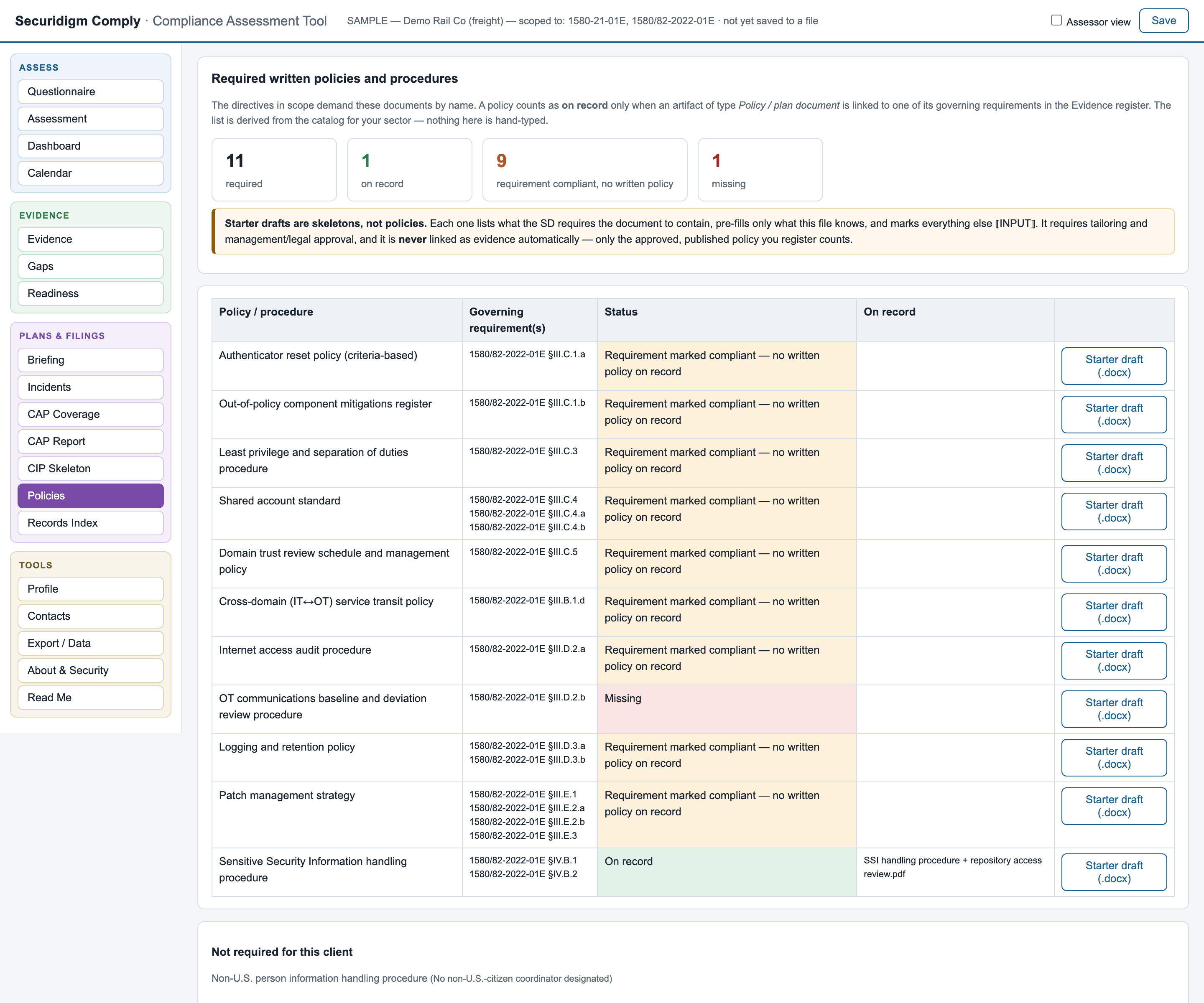
The directives demand a set of written policies and procedures by name — eleven or more depending on sector — and they differ (rail's criteria-based password policy is not pipeline's reset schedule). The checklist derives the list from the directive text and shows three states — on record, missing, and the one that causes findings: requirement marked compliant, no written policy on record.

  • Starter drafts for any missing policy: the regulatory basis with each governing requirement's current status and on-file evidence from your assessment, a checklist of what the directive requires the document to contain, roles and known artifacts pre-filled — and "skeleton" stated in the title, the first line and the footer
  • A starter draft never counts as evidence; only the approved policy you register does
Required policies checklist
Required policies checklistClick to enlarge
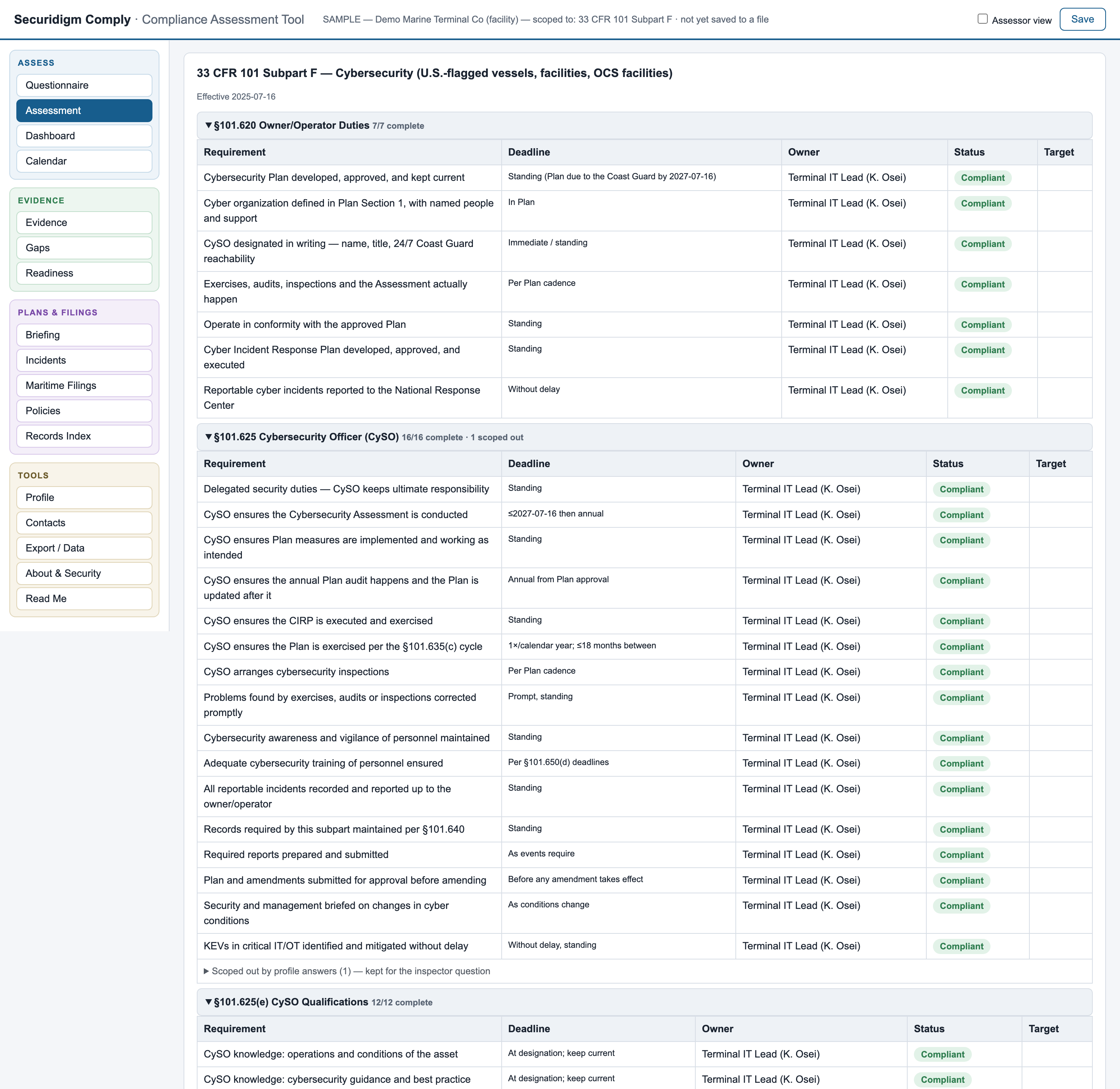
11 — Maritime

The fourteen-section Cybersecurity Plan — and the Coast Guard's clocks

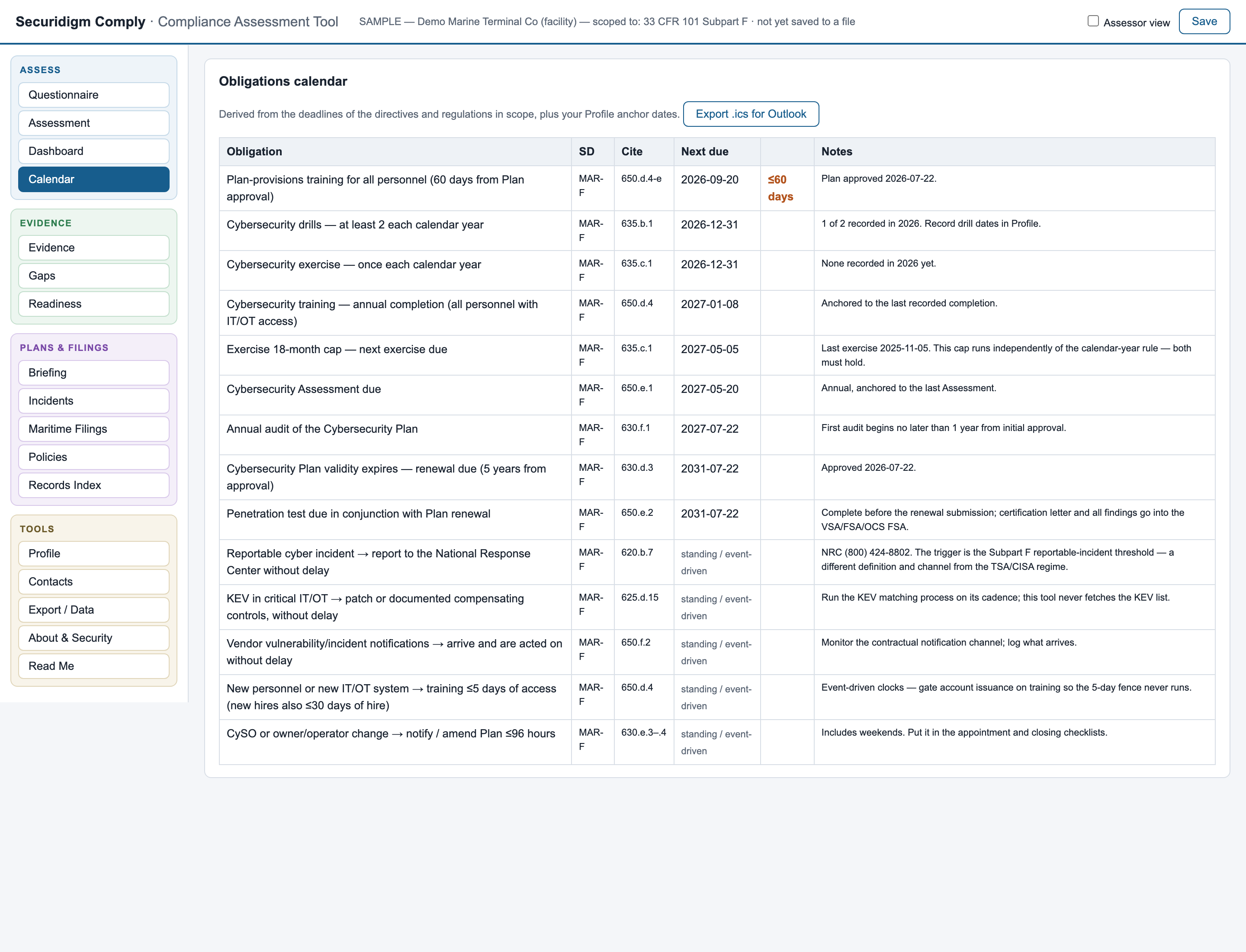
The Maritime edition generates the §101.630(c) Plan skeleton in the regulation's own prescribed section order, each section carrying the requirements that must document there — with each requirement's assessed status and on-file evidence, your program dates, the open-gap register and your incident history pre-filled from the assessment, everything the file knows marked for your review. The calendar runs the deadlines the way the regulation actually works: the 2027 Plan and Assessment dates, the drill count per calendar year, the exercise rule's two independent constraints — and the January 2026 training baseline shown honestly as overdue if your records can't prove it.

  • Assessment record, penetration-test certification letter (the prescribed artifact, as a provider deliverable format) and CIRP starter — all marked STARTER DRAFT on their face
  • Incident records on the National Response Center's without-delay regime — kept strictly separate from the TSA/CISA 72-hour machinery, in both directions
  • The §101.660 readiness list: what the Coast Guard can ask for on request, matched against your evidence register
Maritime obligations calendar
Maritime obligations calendarClick to enlarge
Records index (§IV.A)

Your evidence register re-sorted into Security Directive sequence — the index the directive requires when you rely on existing documents. Printable, and embedded in the CIP skeleton.

Every TSA inbox, by purpose

Receipt confirmations, coordinator details, and unable-to-implement notices go to different addresses — and they differ between rail and pipeline. The Contacts view lists the right one for each, with your coordinators and the 7-day update clock beside them.

Change history on every requirement

Who set which status, when, from what — the trail an inspector asks for when a status looks too convenient.

Compliance trend

A snapshot on every save; the executive briefing shows "61% → 84% since March" instead of a number with no direction.

Word documents with no Word library

CAP, CIP skeleton and policy drafts are written directly in the .docx format by the tool itself — the same zero-dependency, zero-network discipline as everything else.

Deterministic, inspectable, no AI

Every generated document is templates, rules and arithmetic over your own data. The same input always produces the same output, and there is no model to leak your SSI into.

The security case

Built for operators who don't trust software — correctly.

Your completed assessment describes your vulnerabilities. It should never live in someone else's cloud. So this tool isn't a portal, a platform, or a service — it's a single readable file, and every claim below is verifiable on your own machine in five minutes.

Zero network connections

No analytics, telemetry, update checks, external fonts, or cloud calls. Nothing you type is transmitted to TSA, a vendor, or anyone. Enforced by an automated test on every release of the file.

Your data lives in exactly two places

The client file you save where you choose, and a crash-recovery copy in your browser you can wipe with one button. Nowhere else. Ever.

Your documents never enter it

Evidence files are fingerprinted in memory and discarded. A stolen copy of your assessment file contains pointers and hashes — not your firewall rules.

Zero third-party code

No libraries, frameworks, or package dependencies. There is no supply chain to compromise and no upstream project that can be abandoned.

Not a TSA channel

The tool submits nothing to TSA. All submissions remain the deliberate, human, prescribed acts the directives require. SSI-aware handling guidance is built in.

No vendor to outlive

If the tool disappeared tomorrow, your record survives: an open-format data file plus a standalone Excel workbook with live formulas.

Don't take our word for any of it — the app tells you how to check
  1. Airplane-mode test — disconnect entirely; every feature still works, including Excel export.
  2. Network-tab test — open your browser's developer tools and watch: the request list stays empty.
  3. Read the source — it's one readable file. Have your IT person inspect it before anyone types a word.
And the limits, stated plainly, because trust pages that hide them are sales copy: the data file is readable text — protect it with your normal file controls (disk encryption, restricted folders); there is no login — anyone with the file can open it; one person edits at a time, with a merge tool to reconcile copies; and the requirement paraphrases are advisory — validate against the official text — TSA's directives, or 33 CFR 101 subpart F for the Maritime edition — before any submission. All of this is printed inside the app itself, on a dedicated About & Security page.
The demo is the product

No demo video. No sales call. Request the file, open it, and click.

There is a demo build for each sector — pipeline, freight rail, passenger transit, and maritime — each carrying only its own sector's catalog and a fully worked sample operator: every applicable requirement answered to the standard we expect, deliberately not fully compliant, because the worked gap entries, drift flags, and evidence trails are the demonstration (the maritime demo carries all three population samples — facility, U.S.-flagged vessel, and OCS facility). Every view, every feature, freely explorable; nothing persists. Running a live assessment of your operation — with saving, your data file, and annual directive-renewal updates — is what the licensed build adds.

Pipeline / LNG

Both pipeline directives. Shows the forensic-memory requirement no rail operator has, the encryption rule with no escape hatch, and a non-U.S. coordinator handled correctly.

Freight railroad

Both rail directives. Shows PTC handling, an approved-plan commitment that drifted — flagged with its amendment clock — and an evidence register of ~18 reusable family artifacts.

Passenger transit

TSA-designated, so BOTH rail directives apply — the full implementation-plan regime on 109 requirements, a first-CIP-cycle narrative, and one live overdue exercise on the calendar, because that's realistic. (A non-designated agency simply lacks the 2022-01E scope — the wizard models that too.)

Maritime facility

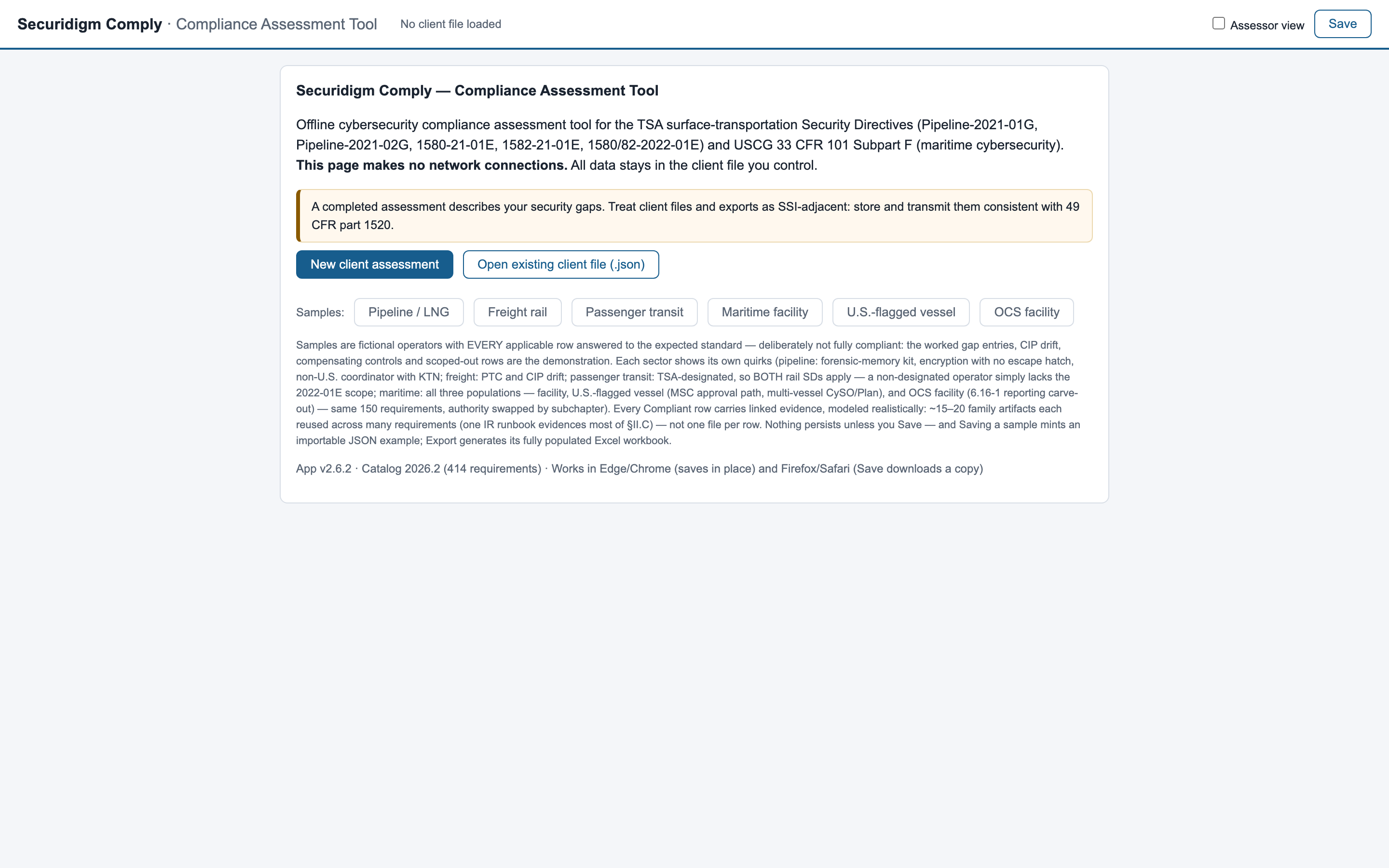
33 CFR 101 Subpart F, subchapter 105. Shows the Coast Guard clocks live (Plan approval anchoring the audit and 5-year validity), the drill and exercise date-list rules, a closed NRC-reported incident with its case reference, and a worked auditor-independence gap — the small-operator trap.

Start screen — four sample operators
Start screen with the four sample operatorsClick to enlarge
Pricing

Priced against one avoided finding, not against software.

Regulator civil penalties — TSA's and the Coast Guard's alike — run to five figures per violation per day. Every tier below costs less than the finding it prevents — and every tier keeps your data on your machines. Deliverables map to your edition's regime: the TSA editions work the CIP/CAP artifacts and the 72-hour clock; the Maritime edition works the Cybersecurity Plan, drill/exercise cadences, and the National Response Center regime.

Licensed Tool

For operators with the staff to run their own program
$6,500 one-time, per operator
+ $2,500/year directive-renewal updates & migration support
  • The full tool, licensed to your operation
  • Every requirement of your edition's regime — the directives, or 33 CFR 101 Subpart F — scoped and guided
  • Evidence register, calendar, Excel & briefing exports
  • CAP, annual report, CIP skeleton and policy drafts (TSA editions) — or the Cybersecurity Plan skeleton, Assessment record, pen-test letter and CIRP (Maritime) — plus incident reports, all generated from your assessment
  • Updates when your regime's text changes — statuses carry forward, changes flagged for re-review
  • Onboarding session for your team
Ask about licensing
Most engagements start here

Guided Assessment

We assess, you operate
from $18,000 per engagement
One flat engagement, whichever directives apply to you
  • Everything in Licensed Tool
  • Full gap assessment conducted with you, requirement by requirement
  • Approved-plan commitments — Implementation Plan or Cybersecurity Plan — mapped against actual practice, drift flagged
  • Gap register written to inspection standard — remediation plans, compensating controls, regulator-facing risk
  • Evidence register built and readiness check completed
  • Executive briefing delivered to your leadership
Scope an assessment
Fully managed

Managed Program

Your compliance program, run for you — by the consultant who built it
$3,500 per month retainer
Annual commitment · includes the Guided Assessment in year one
  • Everything in Guided Assessment, kept continuously current
  • Obligations calendar managed — plan updates, reports, and filings prepared on their clocks
  • Incident-response exercises designed, facilitated, and documented to your regime's standard
  • Assessment cadence tracked — the 1/3-per-year CAP coverage TSA expects, or the maritime drill counts and the exercise rule's two constraints
  • Renewals and amendments migrated and re-reviewed for you, every cycle
  • Pre-inspection readiness runs, and support assembling records when your regulator asks
  • Guidance on reportable incidents — keeping the 72-hour clock, or the NRC's without-delay rule, met
Discuss a managed program
Every tierLicensed per operator · your data never leaves your machines · SSI-aware handling built in · no cloud dependency, ever · cancel and keep your records — the data file and Excel workbook are yours

Sold as four editions — Pipeline, Freight Rail, Passenger Rail & Transit, or Maritime — at the same flat price per edition: a client receives exactly the catalog they licensed, physically and verifiably. One flat price per edition, per operator — no per-directive or per-site math; an operator regulated under both regimes (for example pipeline and maritime) licenses each edition separately. The managed program does not replace your own designated Cybersecurity Coordinator or CySO, which the rules require to be your personnel.

Questions operators actually ask

Frequently asked.

Not covered here? Ask directly — michael@securidigm.com

Does this send our data to TSA?

No. Nothing is sent anywhere, to anyone, ever. TSA submissions remain the deliberate email-based acts the directives prescribe — this tool prepares you for them and tracks them; it never performs them.

Where does our assessment data live?

In one file, saved wherever you choose — your own server, SharePoint, an encrypted folder. Plus a local crash-recovery copy in your browser that you can clear with one button. There is no cloud component to breach.

What does it need to run?

A browser. Nothing else — no install, no admin rights, no account, no network. Double-click the file on the most locked-down machine you own and it runs. Chrome or Edge give the best experience (Save writes straight back to your data file); Firefox and Safari also work — there, each Save downloads a fresh copy of the data file and you keep the newest.

Can more than one person work in it?

One person edits at a time — deliberately: a compliance record needs one accountable pen. The file lives wherever your team shares files, an assessor view adds a second layer of eyes with its own attribution, every status change is logged with who set it and when, and if two copies do diverge, a built-in merge tool reconciles them difference by difference instead of silently overwriting.

What happens when TSA renews the directives, or the Coast Guard amends the regulation?

You receive an updated tool file. Open your existing data with it: statuses carry forward requirement-by-requirement, anything TSA changed is flagged for re-review, and the migration report is stored in your file as an audit trail.

We don't run Microsoft 365. Is the guidance useless to us?

No — flip one profile setting and every Microsoft-flavored recommendation appends the capability the requirement actually needs plus common equivalents. The directives are capability-based; no requirement anywhere names a product.

Is this a legal compliance determination?

No, and it says so prominently. It's a working self-assessment built from careful paraphrases of the directive text — the tool itself instructs you to validate requirement wording against the official TSA documents before any submission or inspection.

Does it write our CIP, CAP and policies for us?

It generates them as drafts from your assessment — the CAP and annual report almost completely (they are schedules and tallies), the CIP as a structured skeleton, and policies as skeletons that state plainly they are not finished. Every generated document marks what only you can supply and what an assessor must review, and none of them pretends to be approved. What you get is the end of the blank page and of structural mistakes; what remains is your judgment.

Is the free demo the full product?

It's the full interface with your sector's fully worked sample data — explore everything, verify every security claim. What it doesn't do is run an assessment of your own operation: creating client assessments, saving, and file import are licensed-build features, and licensed builds include the annual catalog updates when TSA renews the directives. The demo exists so your decision is informed, not so the decision is unnecessary. Verify the file you received is authentic — check with shasum -a 256 (macOS/Linux) or certutil -hashfile <file> SHA256 (Windows) against your sector's hash:
Pipeline cdf64d866c573af517d350d752c68d411b01763a013beaf8f69cf74657a30bd6
Freight cee39e99779b9e082e404977693613a913742c79f627cef5c8329469c98f49af
Passenger a5728561831980de3d66c2616b086fc54f8282cee6a7b5d4763022088dec174f
Maritime d2a15050ee158aa368a47ab0caf51c4ae20b39c060f947272a4c759b8cbcb68f

We're a maritime facility, not a TSA-directive operator. Is this for us?

Yes — the Maritime edition covers 33 CFR 101 Subpart F end to end: all 150 individually enumerated requirements for U.S.-flagged vessels, facilities and OCS facilities, the Coast Guard clocks (the 2027 Plan and Assessment deadlines, the already-passed 2026 training baseline shown honestly as overdue, the twice-a-year drill and 18-month exercise rules), the fourteen-section Cybersecurity Plan skeleton, and incident records on the National Response Center's without-delay regime — which the tool keeps strictly separate from the TSA/CISA 72-hour regime.

We operate multiple sites — or both a facility and vessels. How does licensing work?

A license is flat per operator — no per-site, per-vessel, or per-directive math. Within the tool, an assessment file tracks one regulated population (facility, U.S.-flagged vessel, or OCS facility — the choice sets the review authority, COTP/OCMI or the MSC, in every relevant row), and the rule allowing one CySO to serve several assets is modeled where the regulation provides for it; an operator spanning populations simply runs a file per population under the same license. An operator regulated under two regimes — say a pipeline operator with an MTSA-regulated facility — licenses each edition separately.

Why should we trust a file over a "real" platform?

Inspect it. A single readable file with no network access and no dependencies has far less that can go wrong than any portal — and unlike a platform, every security claim it makes can be tested by your own IT person in minutes.
One file, by email

Get your sector's demo — the full interface, a fully worked sample operator.

Open it, explore the samples, run the airplane-mode test. If it isn't obviously useful in fifteen minutes, delete it — it uninstalls by being deleted.

Request the demo file
Click anywhere to close